The features below have little in common except their effect on a tired on-call engineer at 2 a.m. Each one adds a view that did not exist in the platform before, and each of them addresses a class of question that the previous dashboards could not answer: "is there a different theory of what is going wrong here?", "is this ingress healthy, or only not crashing?", "is the URL actually reachable, or only listed as up?". None of these is dramatic on its own. Together they cover a few of the recurring blind spots we had collected in our own postmortems, and that is what the release is mostly about.
This post walks through what changed and why. There is no single architectural diagram for it — the three features are independent, sit in different parts of the stack, and only share the small theme of "looking at one more thing that turned out to matter."
An investigation that branches
The first feature is a new investigation mode in the agent. Until this release, an investigation followed a single chain of reasoning: pick the most plausible hypothesis, gather evidence for it, write a conclusion, stop. That works when the most plausible hypothesis is right, which it usually is, and fails noticeably when it is not — the agent commits early to the first theory, accumulates evidence around it, and is harder to redirect later than it would have been at the start.
The new mode, available behind a toggle on the investigation page, replaces the single chain with a tree. Given a question, the planner generates a handful of competing hypotheses, the engine explores them in parallel, and the UI shows the tree as it grows. The underlying algorithm is Language Agent Tree Search (LATS), which ports Monte Carlo tree search — the technique behind game-playing programs like AlphaGo — into the world of LLM agents. It is not new in the literature; what is new here is the integration into a working investigation product, with all the production concerns that come with that. We wrote separately about the design choices that shaped this engine in Tree-search agents: building an AI agent that survives a wrong first guess; this post focuses on what actually shipped.
The engine is plainer than the academic paper suggests. Each node carries a hypothesis ("the latency spike is caused by ingress saturation") and, once explored, a confidence score between 0 and 1 returned by an evaluation pass over the agent's findings. The orchestrator behind a node is the existing planner-and-tools pipeline, scoped to one hypothesis instead of the full question. Metrics queries, log searches, and trace lookups are all available to it. The interesting part is what the tree does on top.
Selection uses Upper Confidence Bound for Trees (UCT), the same formula MCTS engines have used for two decades: balance exploitation (descend into the highest-scoring branch so far) against exploration (try a sibling that has fewer visits). When a node's score crosses a threshold — 0.3 in the current build, low enough to be permissive — the engine expands it into two child hypotheses that refine or specialize the parent.
Backpropagation departs from textbook LATS. Instead of averaging child rewards as the paper does, we propagate the maximum of a node's children up the tree, which biases the search toward the most promising leaf at the cost of the regret guarantees UCT was designed for. In practice it matches how human investigators reason — one strong piece of evidence is worth more than three weak ones, and a node with one high-scoring child should be revisited even if its other children went nowhere — but it does mean UCT is doing a slightly different job here than it does under the textbook bandit setting it was derived for.
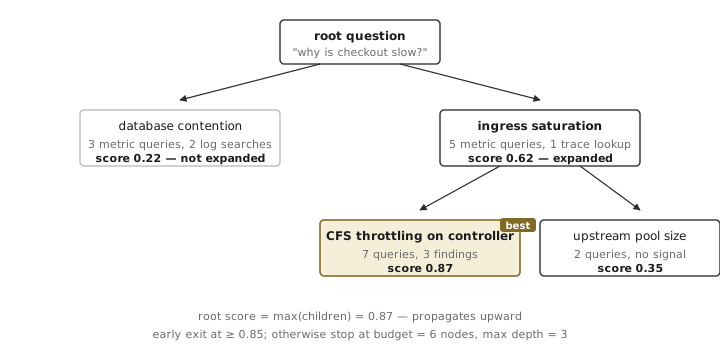
Four numbers determine the shape of the search and are exposed as configuration: a budget of 6 node investigations per run, a maximum tree depth of 3, an early-exit threshold of 0.85, and a UCT exploration constant of √2 ≈ 1.41 (the textbook default). The budget is the part the user notices: at six nodes, each running its own orchestrator with its own tool calls, the run costs in the order of ten times what a single-shot investigation costs, which is why the toggle in the UI carries an explicit cost warning. The numbers themselves are a tuning question, not a published result; if your tree feels too narrow, raise the budget, and if it feels too greedy, raise the exploration constant.
Three smaller details are worth pointing at, because each of them came up in early testing and each one fixed a different failure mode.
Retry-on-tool-error middleware. Tree search amplifies the cost of a single failed tool call out of all proportion. In a single-chain investigation a transient timeout on one log query is annoying; in a tree search it can score an otherwise-good hypothesis as a dead end and steer the rest of the run away from the correct answer. The middleware retries failed tool calls inside the orchestrator with a short backoff, which raises the cost of bad-luck failures from "loses a hypothesis" to "delays it by a couple of seconds."
The "best" badge floats. The UI marks the highest-scoring leaf as the current best. That marker moves while the run is still in progress, which is the only behavior consistent with the underlying scoring: a hypothesis can climb from 0.62 to 0.87 partway through, or a sibling can leapfrog it on a later round. A user watching the tree gets a live answer to "what does the system think the answer is right now," with the understanding that "right now" may change.
Stoppable. A six-round investigation can take long enough that a user decides they have seen enough at round three. A stop button in the UI sends a signal that the engine respects: any in-flight node finishes, no new ones start, and the synthesis step runs on whatever the tree contains. The dashboard generator does the same. The reason this matters is that without a stop button, the implicit choice is between "wait it out" and "leave the tab," and the second option leaves orphan agent runs on the server.
The synthesis step at the end is unsurprising: it takes the best path from root to the highest-scoring leaf, asks the planner to summarize the findings along that path into a narrative, and optionally generates a dashboard that pins the supporting metrics and logs into a single view. It is the same synthesis that a single-chain run produces, fed a much better-evidenced set of findings.
The honest summary, after a few weeks of using this mode internally: it is roughly ten times more expensive than a single-chain run — six node investigations, each with its own evaluation pass, plus the final synthesis step that re-reads the winning branch end-to-end — and on the questions where the first guess would have been right anyway, it lands at the same answer for ten times the bill. The cases where it earns its keep are the ones a single-chain run was getting wrong: questions where the most plausible hypothesis was not the right one, and the agent needed permission to consider a different theory. That is also the set of cases where a human investigator would have spent the most time, which is the right way to read the cost ratio.
Ingress, watched as an ingress
Kubernetes ingress controllers are usually monitored as ordinary deployments. They have pods, the pods have CPU and memory, and the cluster's general dashboards report on them along with everything else. That works until it does not, and the place it stops working is usually the same: the controller is the path every request takes through the cluster, and the way it degrades is not "it falls over" but "it slows everything down." Ordinary pod monitoring tells you the first kind of failure. The second kind needs different views.
This release adds a dedicated ingress section to the platform, with a cluster-wide ingress dashboard and a per-ingress detail page. The dashboard shows aggregate traffic for the controllers (request rate, latencies, per-backend RPS), surfaces the routing rules each ingress resource declares, and adds three charts whose absence is the actual reason this work was done.
The three charts:
- Controller CPU usage, per pod, overlaid with two reference lines: the CPU capacity of the node each pod runs on, and the per-pod CPU limit declared in the pod spec. The lines are dashed and labeled so the reader can see, at a glance, whether a pod is near its container limit, near the node ceiling, or comfortably below both.
- Controller memory usage, per pod, with the same two reference lines: node allocatable memory, and the per-pod memory limit. Same layout, same idea.
- CPU throttling and scheduling pressure, per pod — the chart that does not exist in the cluster's general dashboards. Two metric series: time spent throttled by the kernel's CFS bandwidth controller, and time spent waiting in the runqueue because the scheduler could not find a slot. The throttling metric is read from each container's
cpu.statcgroup file, where the kernel already accounts it asnr_throttledandthrottled_time; the scheduler-delay metric comes from eBPF probes onsched_switchandsched_wakeup. Both are aggregated per container and charted as a 5-minuterate()per pod.
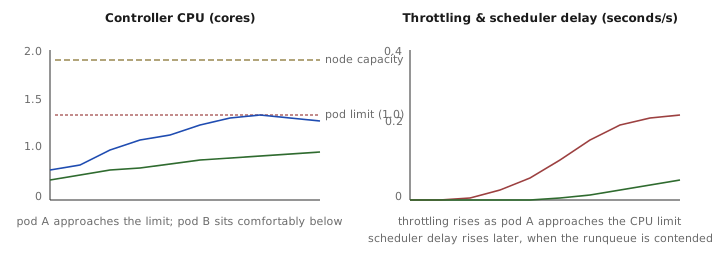
The two metrics in the third chart are container_resources_cpu_throttled_seconds_total and container_resources_cpu_delay_seconds_total, exposed by our agent under its own container_resources_* prefix to keep them distinct from cAdvisor's container_cpu_* namespace. The first is the kernel's accounting of how long a cgroup was held at zero CPU because it had used its quota in the current period; the second is the time tasks spent waiting in the runqueue because the scheduler could not find a free CPU. Both numbers are usually invisible to dashboards that only watch container_cpu_usage_seconds_total, because a throttled container reports a lower CPU usage rate (it is, after all, not using CPU when it is throttled), not a higher one. A pod can be at 60% of its limit on the usage chart while spending most of every CFS period throttled, which is the configuration where the controller's latency budget goes to seconds.
The per-ingress detail page reuses the same building blocks at a finer scope. It shows the routing rules for that ingress resource — host, path, backend service — request rate and latency scoped to traffic matching those rules, and a backend RPS breakdown so a slow endpoint can be traced to a single backend behind a single rule. The same three controller charts are pinned at the top of the detail page, so the operator looking at "why is this ingress slow" does not have to flip between two pages to check whether the controller serving it is the one being throttled.
Three small fixes that landed alongside the dashboard are worth mentioning, because each of them is the kind of thing that breaks a multi-cluster setup quietly and is easy to ignore in a single-cluster demo. Cluster-name resolution: the agent's cluster label is not always the same as the display name in the UI, and the dashboard now resolves the agent label rather than the display one when building queries. Namespace discovery: ingress controllers do not always run in ingress-nginx — the dashboard now discovers the namespace from the cluster's metadata instead of hardcoding it. Decimation robustness: pods come and go, and a pair of time series with non-overlapping lifetimes used to crash the chart at the decimation step; the chart now decimates each series independently. None of these are features in their own right; they are the line items that make the feature usable on more than the one cluster it was developed against.
What the user actually sees
The third feature is the smallest of the three and the one most likely to be confused with something a customer already has. Many monitoring stacks have an HTTP ping — a five-second-interval curl against a URL, recording status code and response time. That kind of probe answers a narrow question: is the URL reachable from the prober's network. It does not answer the question users actually ask, which is some version of "did the page load."
The new URL monitoring service launches a real browser session in the cloud, navigates to the URL, and records timings from the browser's own performance model. The backing service is called pingator, which is a small joke at its own expense: a ping is exactly what it does not do. Each probe run is a cold-cache page load: the cache is disabled, service workers are bypassed, and the run records the same Navigation Timing breakdown the browser would expose to a developer console — redirect time, DNS, TCP, TLS, request (time to first byte), response (body streaming), DOM processing up to DOMContentLoaded, and the time spent loading subresources before the load event fires. The HTTP status code, redirect count, and final URL after redirects are also recorded.
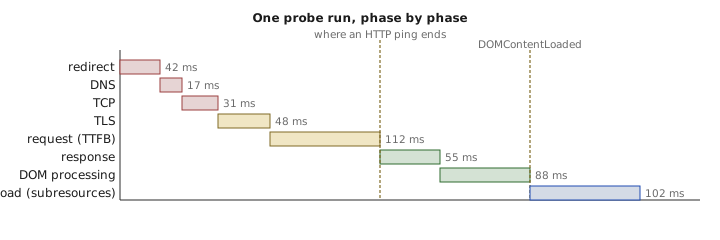
The cache-disable and service-worker bypass are configured through the Chrome DevTools Protocol on the browser the probe drives: Network.setCacheDisabled to force a cold cache, and Network.setBypassServiceWorker so any registered worker does not short-circuit the load. The reason they matter is that without them, the second probe to a page loads about a quarter of the bytes from cache and reports a load time that has very little to do with what a first-time visitor sees. With them, every probe simulates a first-time visit, which is the only number worth alerting on.
Each probe emits a histogram per phase, tagged with the target URL, into VictoriaMetrics. The frontend reads them through the same metric-query plumbing the rest of the platform uses and renders a stacked-area chart per phase, so the breakdown is one chart instead of nine, with a synchronized zoom across all the probes the user has configured. There is also a tab for adding, deleting, and toggling targets, and a per-target switch for running a Lighthouse audit on the same cadence; Lighthouse runs are heavier and are off by default.
The "retry session logic" fix that landed shortly after the initial commit is the kind of detail worth pulling out: the prober used to treat any non-2xx status as a hard failure and tear down the browser session before recording timings. For sites that legitimately respond with 3xx redirects or with 401 on health endpoints, that meant the timings vanished while the probe reported the wrong cause. The retry logic now distinguishes "the page never loaded" from "the page loaded and the server said 401," records the timings in both cases, and only tears down the session for transport-level failures. The shape of the bug — a probe that quietly drops its own observations when the response is not what it expected — is one we have written about before; this was a small in-house version of the same pattern.
What this is and is not: this is synthetic monitoring, with one prober (currently in a single region) hitting the URL on a configurable interval. It is not real-user monitoring — the platform does not yet correlate the synthetic numbers with timings from actual visitors, and it cannot tell you whether the slow page load reported by one of your customers is the page being slow or the customer's network being slow. The synthetic numbers do, however, give you a stable baseline: if the probe says DOMContentLoaded is suddenly 1200 ms when it has been at 400 ms for a month, and the probe is the same code on the same hardware, the regression is on the page.
What this kind of release tends to look like
Reading the three features back, the unifying thread is not the technology — tree-search agents, kernel cgroup accounting, and headless browsers do not share much — it is the kind of question each one teaches the platform to answer.
The investigation tree answers "is there a different theory than the one I'm following?". The cost is that the single-chain mode is cheaper and almost always sufficient; the value is in the cases where "almost always" is the wrong assumption to bake into the tool.
The ingress dashboard answers "is this controller slow even though it isn't broken?". The cost is one more page in the navigation and a few more queries against the time-series store; the value is in showing the kind of degradation that does not move the CPU chart and would otherwise be diagnosed by hand from raw cgroup stats on a problem host.
The URL monitor answers "does the page actually load, from somewhere that is not inside the cluster?". The cost is a browser instance per probe and a Lighthouse run if the operator wants it; the value is in catching the failures that an HTTP ping cannot see — broken subresources, slow JavaScript on the critical path, a redirect chain that quietly added two hops.
None of these are revolutionary. Each of them closes a question that the platform could not previously answer without manual work, and each one was prompted by a specific incident or postmortem where the gap was the limiting factor. That is, broadly, how additions to a working observability product tend to get justified: someone notices the data they needed was not there, writes it down, and the next release fills the gap. The dashboard is quieter than the incidents it prevents.