An observability platform's most basic job is to show the right chart at the right time, and most of the friction in using one comes from the gap between knowing what you want to see and getting it onto the screen. The platform either has a page for your question and you click to it, or it doesn't and you write the PromQL yourself. This release narrows that gap from both directions: it adds a way to generate a dashboard from a sentence, with the plumbing to make the generation reliable enough to trust, and it adds three pre-built dashboards for the questions that came up often enough to deserve a permanent page of their own. Underneath both of these, full-text log search moved off ClickHouse and onto Manticore for recent windows, which makes a different kind of question — "did anything log the word timeout in the last hour" — cheaper to ask.
Read in one go, the six features below describe a release where the platform spends less of the user's time on the gap between intent and screen.
Generating a dashboard from a sentence
The user types a description of what they want to see — "show me request rate, error rate, and slow queries for the checkout service over the last hour, grouped by pod" — and the system produces a dashboard: a sequence of collapsible rows, each row containing charts, tables, and short markdown text panels arranged into a 3-column grid. The dashboard streams onto the page as the model builds it, row by row, with skeleton placeholders for panels whose configurations have not yet arrived. Most of the engineering in this feature went into the parts the user does not directly see — the validation step described below, in particular, which is what makes the generation reliable enough to put in front of someone investigating a real incident.
The streaming is over Socket.IO. The agent emits a small set of typed events — LAYOUT_START when the top-level grid is sized, ROW_START as each row's title and child panel names become known, LAYOUT_SLOT to draw a skeleton, COMPONENT_CONFIG to fill in the actual panel spec, and LAYOUT_COMPLETE at the end. The UI renders each event as it arrives. The reason for streaming, beyond the obvious user-perceived latency win, is that an LLM-generated dashboard has perceivable progress in a way that other LLM outputs typically do not: the user can see that the model has decided on a row called "Database health" before the model has finished filling in the panels inside it.
The piece worth describing in detail, because it is what makes the generation trustworthy enough to put in front of a real user, is the validation step. The model generating dashboard specs is good but not careful; it will happily produce a pie chart of a counter, or a gauge fed by a metric that returns thousands of series. Before this release, those were the failure modes that broke generated dashboards in practice. The validation step is a deterministic linter that runs over the candidate spec before any rendering happens, classifies issues into four severity-tagged categories, and feeds the warnings back to the planner so it can self-correct.
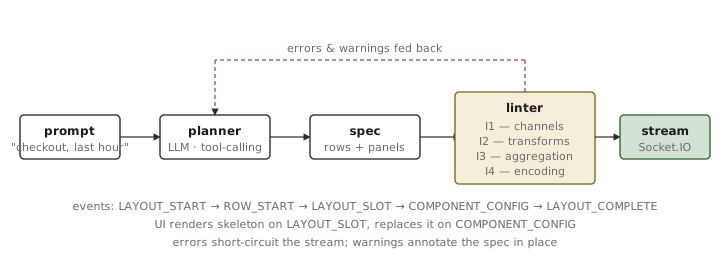
The four rule families come up often enough in practice that they are worth naming, because each one corresponds to a specific way an unconstrained model gets dashboards wrong:
- I1 (error) — illegal channel mapping. The visualization type cannot represent the data shape. A gauge with continuous data and more than three discrete color bands; a gauge bound to a categorical dimension. Either you have a number and want a single readout, or you have a series and want a chart; the model conflates these.
- I2 (error) — incorrect transformation. A cumulative counter plotted as raw values rather than as a rate over time; a percentage axis combined with a log scale; percentage formatting applied to a metric that isn't a ratio. These render, and they render badly.
- I3 (warning) — aggregation failure. A query without any aggregation, on a metric the cardinality estimator expects to return more than a thousand series. A bounded-cardinality allow-list exempts metrics whose label sets are known to stay small, where the unbounded query is fine.
- I4 (warning) — encoding expressiveness. A pie chart of a time series; a heatmap of a metric that isn't bucketed; a stat panel summarizing a counter rate without any grouping. The visualization is technically renderable; it just answers a question nobody asked.
I1 and I2 are errors and block the spec from rendering until corrected. I3 and I4 are warnings that pass through but annotate the spec; the UI shows them in a small badge so a user who knows what they wanted can override the linter's opinion. The planner, when it sees error feedback, replans the offending panels rather than the whole dashboard. In the cases where we have measured it, one correction pass is usually enough; two is occasionally needed; the loop is capped to keep a stuck planner from spending the user's budget.
The tradeoff to flag, because it would otherwise be the first thing a careful reader notices: a generated dashboard still costs an LLM call per panel-cluster, and a complicated one runs the linter feedback loop on top. For a question whose answer is "the standard service overview," this is more expensive than clicking on a service in the navigation. The shape of question where the generator earns its place is the kind that doesn't have a pre-built page — something cross-cutting, scoped to a specific incident, or stitched from metric series that the user has not memorized the names of.
Picking a model, and what happens when it falls over
The second feature is the settings page that sits behind the first. The AI features in the platform — investigations, dashboard generation, classification, narrative summaries — have until now been driven by a single configured model. The new page lets an operator pick two models instead of one, and pick them from any of four providers.
The two roles are thinking and execution. The thinking model is asked to plan, reason, and decide; it runs the planner that produces the dashboard spec, the convergence and narrative steps in the investigation agent, and any step that benefits from chain-of-thought. The execution model runs the dense tool-calling work — metric queries, log searches, classifier passes — where what matters is calling a tool correctly fifty times in a row, not deliberating about which tool to call. The split exists because the right tradeoff is different for the two roles: a strong reasoning model is worth its cost on planning, and a fast tool-caller is worth its speed on the execution loop, and using the strong reasoning model for the tool-caller doubles the bill without doubling the quality.
The supported providers are Anthropic, Google, OpenAI, and OpenRouter. The model list for each is fetched live from the provider's API, cached for an hour, and filtered to the current-generation, tool-using, vision-capable models — the work both roles ask the model to do needs all three. In practice the list spans Anthropic's Claude 4.x line (Opus, Sonnet, and Haiku at the time of writing), Google's Gemini 3 family alongside the still-supported 2.5 generation, OpenAI's GPT-5 line and its o3 and o4 reasoning siblings, and the vision-capable models reachable through OpenRouter. Older non-tool-use Claude versions, text-only chat models, and embedding or image-generation families are filtered out before the list reaches the picker.
The list as presented to the user is sorted newest-first by the provider's own creation timestamp, with thinking-capable models pinned to the top of the list within each provider so they are easy to find. Search is debounced as you type, which matters because the combined list across four providers runs to a few hundred entries.
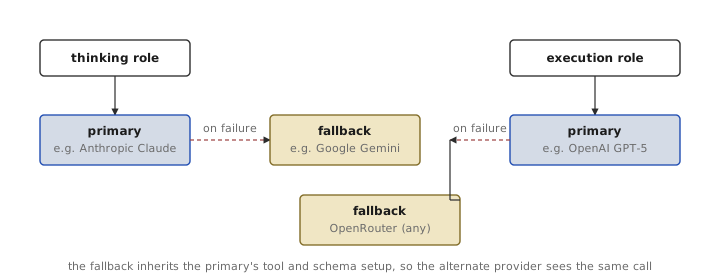
The fallback itself is wired through LangChain's withFallbacks() primitive, with one subtlety in the ordering that any reader who has tried this themselves will already be wincing about. The bound result of chatModel.withFallbacks([...]) in LangChain.js is a RunnableWithFallbacks, which does not itself expose bindTools or withStructuredOutput; calling them on a fallback chain is what causes the well-known "method not found" errors. The working pattern is the inverse: each provider's model is wrapped with bindTools() or withStructuredOutput() first, and the fallback is then attached on the bound primary so the retry on the alternate provider inherits the same tool or schema binding as the original call. The fallback provider's API key is verified at initialization; if it isn't configured, fallback is disabled silently and the failure mode reverts to a single-provider error.
What this is and is not: fallback substitutes within a single chain invocation. A retry on the alternate provider receives the same input and produces an output the calling code can use. It does not migrate agent state mid-run; if an investigation is twenty steps deep on Anthropic and Anthropic returns 503, the failing step retries on the fallback provider and the run continues. If the model on either side has been instructed to produce a particular tool-call schema, both providers need to be capable of producing it — which is part of why the model picker enforces tool support and vision support at the filter stage rather than at the call stage.
Three dashboards we drew by hand
The other half of the release is three pre-built dashboards. Each one corresponds to a question we have watched users ask — through support tickets, through internal incidents, through the queries they typed by hand — often enough to warrant a permanent page. The general-purpose generator handles questions that have not been crystallized; the hand-drawn pages handle the ones that have.
Where the request time went
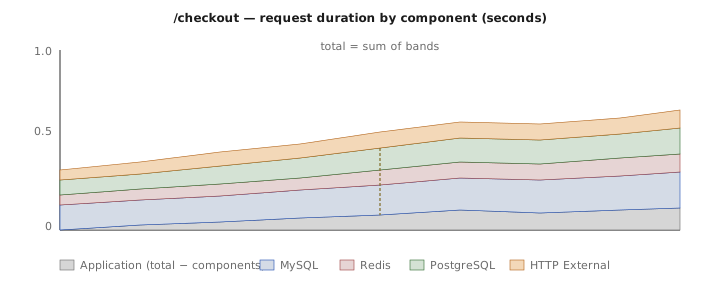
The new APM page asks one question with a chart: out of the time a request spent inside your service, where did the time go? The chart is a stacked area showing per-component duration broken out by category — Application (gray), MySQL (blue), Redis (red), PostgreSQL (green), and HTTP External (orange) — with the totals summing to the request's wall-clock duration. The categories come from the profiler with a per-component label, so the chart pivots on the component name without needing a separate signal per category.
The Application layer is the one worth pointing out, because it is computed by subtraction rather than measured directly. Total request duration is fetched from a separate profiler signal, the per-component series are summed, and the difference is rendered as the Application layer. The trace is honest about what this represents: time spent inside the service's own code, plus any time spent in components the profiler did not instrument. If a workload talks to a downstream service the profiler doesn't recognize, that latency shows up as application time rather than as its own band — the dashboard cannot label what its data source doesn't categorize. In practice that has been a small share, but it is worth knowing the layer is a remainder.
The page is filterable by node and pod, with the standard time-range selector pinned to the top, and resolves resource IDs so clicking on a pod or node leads to the deployment and node detail pages respectively. There is also an indicator for whether the URL pattern is reached primarily via the cluster's ingress or via direct service-to-service traffic, fed by a small extra query that joins the APM data against the ingress metadata. The reason to surface that distinction is that the same URL pattern is often slower when reached over ingress than when reached via in-cluster RPC, and seeing both numbers next to each other makes the difference inspectable instead of guessable.
The other dimension the chart is opinionated about is URL grouping: per-request profiling at full URL granularity blows up cardinality on any service whose URLs contain IDs. The profiler emits a pattern label that has already been collapsed to a template (/orders/:id rather than /orders/47829), and the dashboard pivots on that label. The pattern reduction lives upstream, in the profiler itself; the dashboard reads what's there.
Why this pod restarted
A new tab on the pod detail page consolidates three views of a pod's restart history into a single page. Each view answers a different question that, before this release, required clicking between the pod page, kubectl describe, and a metrics explorer.
The first view is the most recent termination: the container's exit reason and exit code, the reason it is currently waiting if it has not yet come back up, and the pod's CPU and memory requests and limits read out next to those numbers. Having the configured ceilings on the same screen as the cause matters because the most common failure shape in practice — OOMKilled with a memory limit close to the steady-state working set — is the one that explains itself the moment both numbers are visible together.
The second view is the Kubernetes events table. Events are queried from ClickHouse, where they have already been ingested by the platform's collector, so the lookup is fast and the history extends beyond the kube-apiserver's default one-hour retention window for events. The events are scoped to the pod's name and cluster and filtered to the active time range, and they include the standard fields — type, reason, message, count, first seen, last seen — that an operator would have seen running kubectl describe pod at the time the event was emitted.
The third view is a container state timeline. The same per-container status signals are read over the active time range rather than as a single instant, and rendered as a row per container with bands for the running, waiting, and terminated states across the window. This is the part of the page that addresses the common question of "did this pod restart once, or has it been flapping for an hour," which the instant view cannot answer.
The other change worth mentioning is the sidebar. The pod detail page now highlights the parent deployment or daemonset in the cluster navigation tree, so the operator looking at a problem pod has a one-click path up to "all the pods this controller owns." The relationship is resolved through the standard owner-reference chain rather than guessed from names, which matters on clusters where the deployment's name and the pod's name don't share a common prefix.
One deployment, six tabs
The deployment detail page is the largest of the three new dashboards by surface area. Six tabs cover the dimensions an operator typically wants when they have arrived at a single deployment and want to know what's going on with it: Overview, Resources, Network, Dependencies, Traces, and Logs. The tabs share a single time-range selector and pod-filter context, so flipping between tabs is a question of which chart you want to see, not which scope you are in.
The Overview tab is built around the four standard golden signals — request rate, error rate, p95 latency, and a readiness ratio — computed as instant values over a 5-minute window from metrics emitted by the platform's own agent. Two choices are worth pointing out to anyone glancing at the panel, because both differ from what some monitoring products do by default. The error-rate panel counts only 5xx responses; 4xx is treated as client-attributable and excluded, which means a service taking abuse from a single misbehaving caller does not light up the error panel for the operator on call. The availability number is a readiness ratio — pods currently passing their readiness probe over the deployment's desired replica count — rather than the deployment's own "available" count, which would also require pods to have stayed ready past minReadySeconds. The readiness reading reacts faster during a rollout; the trade is that a fresh rollout reads as ready slightly before the deployment controller calls it available.
Below the signals, a pod table groups its rows by status (Running, Pending, Failed, and the long tail of less common phases) and lets the operator collapse the groups they don't care about. The right two columns are restart count and age, because those are the two most common reasons a row needs to be looked at twice.
The Resources tab is where the change worth describing in detail lives. The previous version of the dashboard plotted deployment CPU as a single aggregated line, averaged across all the deployment's pods. That works for headline reporting and obscures exactly the failure mode that you typically want this chart to surface, which is one pod consuming disproportionately more CPU than its peers — either because it's serving a hot key, or because it's leaking, or because the cluster scheduler has put it on a noisy neighbour. The new chart breaks CPU out per pod into a stacked area, so a single tall band is immediately visible inside an otherwise even-looking total.
The stack also includes an "other pods on node" layer underneath the deployment's own pods. The motivation is that an individual pod's CPU has to be read against what else is happening on the same node: a pod can be CPU-hungry, or its neighbours can be, and the operator looking at the chart is trying to figure out which. The "other pods" layer is computed by subtracting the deployment's own per-pod CPU from the node's total CPU, so the chart's top edge is the actual saturation level of the underlying node and the deployment's contribution is visible inside it. Memory uses the same shape, and a third chart shows throttling and scheduler delay aggregated per pod, on the same model as the ingress dashboard added in February.
The remaining four tabs are simpler. Network plots HTTP, TCP, and DNS traffic for the deployment's pods. Dependencies surfaces connection metrics to PostgreSQL and Redis — the two databases the platform currently tracks at the dependency level — with a per-database breakdown when more than one of either is reached. The APM page shown earlier breaks out a wider set of components (including MySQL) because those bands come from per-request profiler labels rather than from the platform's own dependency tracker, which is the answer to the careful reader's "wait, what about MySQL." Traces shows a trace table with a span waterfall, indented by parent-child depth and colored by entity type. Logs renders a log-volume time-series on top of a live tail.
The tradeoff to volunteer, because it would be the first thing a careful reader notices: per-pod CPU breakdown becomes noisy on deployments with many replicas. A deployment with 80 pods produces a chart with 80 bands, which is not easier to read than the previous aggregated line. The dashboard's intended sweet spot is the small-to-medium deployment where one anomalous pod is the typical reason somebody is looking at this page. For very large deployments, the chart is still useful, but the per-pod story is better told by sorting the pod table on CPU and looking at the top few rows.
Searching logs without paying for a histogram
The last feature is structural rather than visual. Until this release, full-text search across logs ran against ClickHouse, which is excellent at structured queries over enormous datasets and noticeably less excellent at "find all the log lines containing the word timeout in the last hour" as an interactive query. ClickHouse will answer that, but at a cost — a substring scan over a hot table — that meant the team had been quietly avoiding interactive substring search and writing structured filters instead.
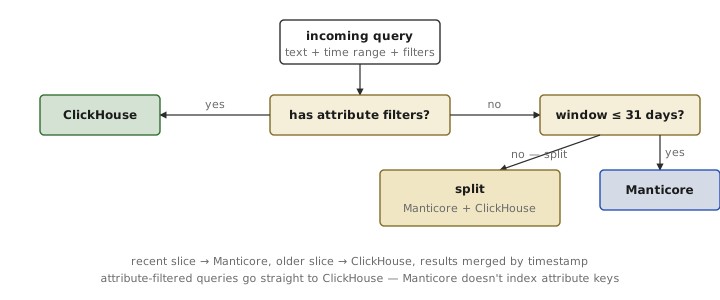
The new path adds Manticore Search in front of recent logs, with a routing layer that picks between Manticore and ClickHouse on a per-query basis depending on what the query is asking for.
The query builder translates the search expression into Manticore's dialect, escaping the characters that would otherwise behave as match operators while leaving the wildcard glyph intact so users can match partial tokens. Both substring and regex modes are supported; regex falls through to Manticore's RE2-backed operator. The frontend debounces the input so a fast typist does not fire a query per keystroke, and pagination is straightforward offset-and-limit with a default page size of 20 and a cap of 50.
The 31-day cutoff is the boundary of Manticore's hot index. Older logs are still searchable, but only through ClickHouse, and queries spanning the cutoff are split — the recent slice goes to Manticore, the older slice to ClickHouse, and the results are merged by timestamp before being paginated. Attribute-filtered queries (filters on resource attributes that the platform stores as columns in ClickHouse but does not index into Manticore) skip Manticore entirely. The router is deterministic, not heuristic; if you can read the query, you can tell which store will answer it.
Two effects of this change are worth knowing about. The first is interactive: substring search over the last hour is now fast enough to type into and read live, which it was not before, and the search bar on the main logs page and the per-service log views both use it. The second is for the agent: the search_logs tool the investigation agent uses to look through logs runs against the same router, which means an investigation pulling on a log thread no longer has to choose between "a precise structured filter" and "a substring search that times out." The router picks for it.
What this kind of release tends to look like
Reading the six features back, the unifying thread is not the technology — LLM agents, Kubernetes metrics, full-text indexes, and request-level profiling do not share much — but the fact that all of them shorten the distance between a user's question and the chart that answers it.
The dashboard generator and the model picker are one half of that: the user describes what they want to see and the platform produces it, with enough deterministic checking around the generation to keep the model from inventing pie charts of counters. The cost is that the generator is an LLM call, sometimes more than one, and the savings show up only on questions that don't already have a page. The value is in not having to write PromQL for a question that comes up once.
The three new dashboards are the other half: questions that come up often enough to be worth permanent pages, drawn carefully so the chart that answers them is the chart you see when you arrive. The APM page answers "where did the time go inside this request"; the pod restart tab answers "why did this pod come back to life sixteen seconds ago"; the deployment dashboard answers "is this workload healthy, and which pod is the outlier if it isn't." The cost is that designing a hand-drawn page is slower than describing one to a model; the value is that the questions on these pages are common enough that paying the design cost once amortizes over thousands of viewings.
The log search change underneath both halves is the one that most easily looks like infrastructure plumbing and turns out, on use, to be the most visible of the lot. Interactive substring search over recent logs is the thing an operator reaches for first during an incident, and the gap between "I think the word timeout appears" and "show me where" had been wider than it should be. The router fixes it for the recent window and leaves ClickHouse to do what ClickHouse is good at.
The pattern across all of this is that observability tools earn a large part of their value by reducing the number of things the user has to type. Six places in the product where a question used to require a hand-written query are now reachable through a prompt, a tab, or a search box — the work each new page is taking off the user's plate is, in every case, the work of remembering which metric name answers which question and assembling the query around it.