Four changes in this release, on either side of the platform, share the same shape. On the UI, the logs page moves filters next to the table they filter, and URL monitoring splits browser audits onto their own tab away from the synthetic-check views they had been sharing space with. On the AI side, the dashboard agent now reads its own rendered output and uses the score as a revision instruction, instead of producing a one-shot draft. And on the observability agent, the data recorded about a connection gains a new layer underneath the application protocol — packet drops at the kernel level, DNS queries flagged by their shape, TCP round-trip time, syslog. The thread that runs through all four is bringing the answer closer to the place the question is being asked.
The logs page, redrawn
The logs page is the screen this product is used on most often, and it had drifted into a shape that was hard to work in. Filters lived above the table, which meant that scrolling down to read a long result list put the filters off-screen exactly when you wanted them. Long log messages were truncated. Columns were not resizable. Selecting a chunk of text in a row, to copy a value, sometimes opened the row's detail panel by accident. Together, these made the page feel narrower than it should have.
This release moves filters to a collapsible sidebar on the left, where they stay visible while the table scrolls. The sidebar collapses with one click when you want the full width back for the result rows. The table itself has resizable columns and proper text wrapping for long messages — no truncation by default — with visible vertical dividers between columns so the row stays readable at width. Timestamps are shown without milliseconds, which makes them shorter and easier to scan; the milliseconds are still on the detail panel for the cases where they matter.
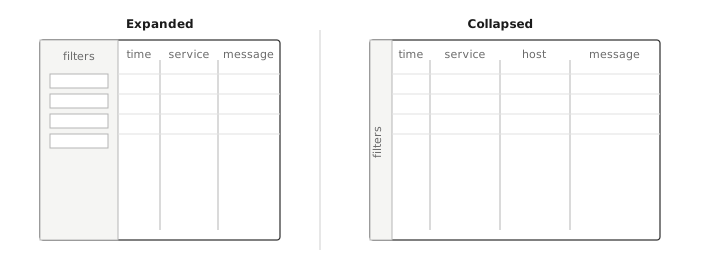
Two smaller behaviors landed alongside the layout work. Text selection inside a row no longer counts as a click — you can drag-select a token without the detail drawer opening on top of what you were trying to copy. And tab navigation now moves between filter inputs in order, with shift-tab moving back. Page titles in the browser tab show the short deployment and host names with namespace, so the OS-level tab list is informative when you have several investigations open at once.
The redesign does not change the underlying query path or which logs are indexed. It is a layout change. The page that opens first when you go looking for something is now better-shaped for what people actually do on it.
Lighthouse, separated from synthetic checks
URL monitoring covers two distinct activities. One is synthetic checks — fetching a URL on a schedule and recording whether it responded, how long it took, and what it returned. The other is browser audits — loading the URL in a real headless browser, running Lighthouse against the rendered page, and recording performance scores, Web Vitals, and a navigation-timing breakdown. The data shapes are different, the user is usually interested in one at a time, and the page had been showing both on the same tab in a way that made each harder to read.
Lighthouse now has its own tab inside URL monitoring, alongside the existing synthetic-check views. The tab carries the performance scores, the Web Vitals, and the navigation-timing chart. The active tab name is synced to the URL, so a direct link goes to a specific view rather than to the default. Charts on the Lighthouse tab hide individual data points by default for a cleaner line; the points are still in the underlying data if you need them at the per-record level. Audits can be enabled or disabled per target — running a browser audit against a URL is more expensive than running a synthetic check, and not every target needs both.
One caveat: the Lighthouse audit measures the page as the synthetic browser renders it from outside your infrastructure. It is not measuring what your real users see in their real browsers, and it is not a replacement for real-user measurement. Lighthouse is good at catching regressions in the page itself; it is not good at catching regressions in your customers' local network. The two questions are different, and the dashboard does not pretend otherwise.
The dashboard agent looking at its own draft
The AI dashboard agent — the one you ask, in plain language, for a dashboard about a service or a question — now runs an evaluation loop on its own output. After the first dashboard is rendered, the agent reads the rendered result, scores it on several axes (layout readability, chart sanity, whether data actually arrived in each panel), and then produces a revision of the spec. The revision is rendered, scored again, and the loop continues until the score is good enough or the iteration cap is reached. The final dashboard is the highest-scored revision the agent produced, not the latest one.
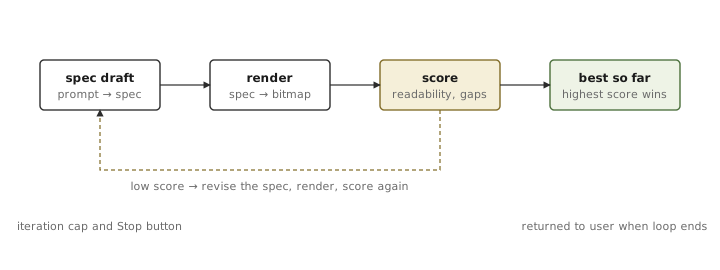
What this fixes, in practice, are the failures that are obvious to a human looking at the rendered dashboard but not to a model looking at a spec. A chart whose y-axis labels overlap. A panel that ended up empty because the query the agent picked filtered out the only series that mattered. A row that exceeded the grid width and pushed the next panel off-screen. The first draft is rarely catastrophically wrong; it is wrong in the small ways that the model could have caught if it had looked at the picture. Pointing the model at the picture costs roughly a single LLM round per iteration, which is the right price for a release-grade dashboard.
The loop has a visible iteration indicator and a current score, and can be stopped at any time. If you stop early, you keep the best revision so far. If the loop reaches the cap, you also keep the best revision so far. The cap is there to bound cost — the loop will not silently keep iterating on an expensive prompt. The cost is real and worth volunteering: a dashboard with the loop enabled costs several times more in model spend than one without, in exchange for fewer dashboards that need manual cleanup afterwards.
Alongside the loop, each panel in a dashboard can now carry its own time range, independent of the dashboard-level setting. Most panels still inherit the dashboard's range, which is the right default, but for the panels where a different window is the whole point — a sparkline over the last 7 days inside an otherwise-1-hour dashboard, for instance — the per-panel override is now part of the spec.
A small adjacent addition is a new dashboard for batch job queues: how many jobs are pending, how many are processing, how many have completed. It is useful in its own right for teams running queue-backed workloads, and it is also the kind of view the dashboard agent now produces well, because queues are the sort of dashboard whose layout has obvious failure modes.
Below the application protocol
The other half of the release is in the agent. The protocol-level parsers that recognize HTTP, Postgres, Redis, MySQL, Mongo, gRPC and a handful of others continue to be where most of the agent's value lives, because those are the conversations operators care about. What this release adds is visibility below those conversations — the network-layer and host-layer signals that used to be invisible to the agent unless something at L7 already noticed them.
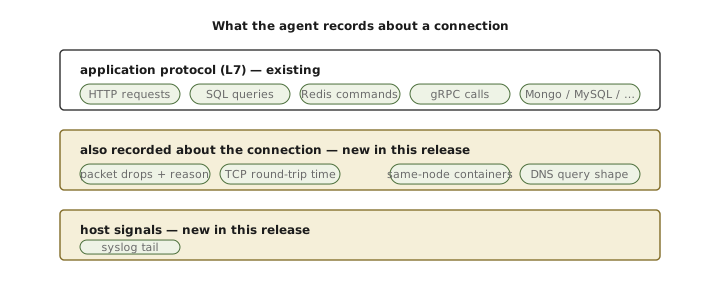
The most visible of these is packet drop monitoring. The agent now detects dropped packets at the kernel level in real time and aggregates them per IP in short windows, tagging each drop with the kernel's reason code. Connection traces are enriched with their associated drop count and reasons, so packet loss appears directly on the connection in the service map rather than as a separate metric that has to be cross-correlated by hand. When the drop rate on a connection exceeds the baseline, the agent escalates that connection to per-packet detail; the rest of the time it runs in aggregate mode, which is the cheap mode. The escalation is the right shape — most of the time you only want the counts, and the moment something is wrong you want as much detail as you can get.
The trade-off to flag: per-packet detail is not free. On a host with a sustained high drop rate the per-packet mode adds non-trivial CPU. The escalation logic is rate-limited for exactly that reason, and the rate limit is configurable.
The second addition is DNS anomaly detection. The agent analyzes DNS queries in real time and flags a small set of suspicious patterns: high-entropy domain names (a common shape for DNS tunneling and for the random-string variety of domain-generation algorithm — wordlist-based DGAs are deliberately low-entropy and the entropy check will not catch those), unusually large queries, sudden spikes in TXT query rate, and excessive subdomain cardinality from a single host. The findings are exposed as metrics — a query size histogram and an anomaly counter — that fit into the same alerting story as everything else the agent produces. This is a rule-based detector and not a machine-learning system, deliberately so: rules are predictable, debuggable, and tunable per environment, which matters more than catching the long tail of novel patterns at the price of a high false-positive rate. The thresholds for entropy, subdomain cardinality, and TXT rate are all individually configurable.
The third is per-connection TCP round-trip time. Connection traces now carry the kernel's own RTT estimate for the underlying TCP connection — the same value exposed through TCP_INFO and visible in ss -ti — without requiring a synthetic probe to estimate it from outside. For internal traffic this is the most accurate latency signal you can get short of instrumenting the application protocol itself, and even there the TCP RTT is usually closer to the network truth.
The fourth is syslog. The agent now tails the host's system log by default — /var/log/syslog on Debian-family distributions, /var/log/messages on RHEL-family ones, and the systemd journal where neither file is populated — and sends entries through the same log pipeline as application logs. The reason this matters is that the most informative messages during a host-level incident — kernel events, systemd state changes, OOM kills, mount-point failures — live there rather than in the application's own log stream, and previously you had to ssh to the host to read them. The collection is on by default and can be turned off where it is not wanted.
The fifth is small but worth naming. Traffic between containers on the same Kubernetes node used to show raw pod IPs on both sides of the edge in the service map, because the agent did not have the metadata to resolve them at trace time. That has been fixed: both ends of a same-node connection now resolve to container names, and the service map for an intra-node hop is finally legible without a side trip to kubectl.
What this release was about
Reading the four changes back, they share a single shape. Each one pulls a piece of information closer to the place a question is being asked. The logs page pulls filters next to the result table they filter, instead of leaving them above it where the act of scrolling pushes them off-screen. URL monitoring pulls browser audits onto their own tab, so a synthetic-check question does not have to wade through Lighthouse data and the other way around. The AI dashboard agent pulls its own rendered output back into its next prompt, so the model that drafted the dashboard can also see what the dashboard looked like. The observability agent pulls the layer underneath the application protocol — packet drops, DNS shape, TCP round-trip time, syslog — into the same connection record that already holds the protocol view, so the network truth lives next to the application truth instead of in a separate tool. Different surfaces, same idea: bring the answer closer to the place the question is being asked.